Automated Invoice Processing in Business Central with Continia Document Capture
Optimize your accounting processes with artificial intelligence
Optimize your accounting processes with artificial intelligence
Continia Document Capture is a smart, automated solution that revolutionizes the processing of incoming invoices within Microsoft Business Central.
It can save you over 10 hours per week while reducing errors and accelerating your approval workflows.
How AI-powered invoice processing supports your business in Business Central
Less manual work. Fewer errors. Faster approvals. Our customers’ results speak for themselves.
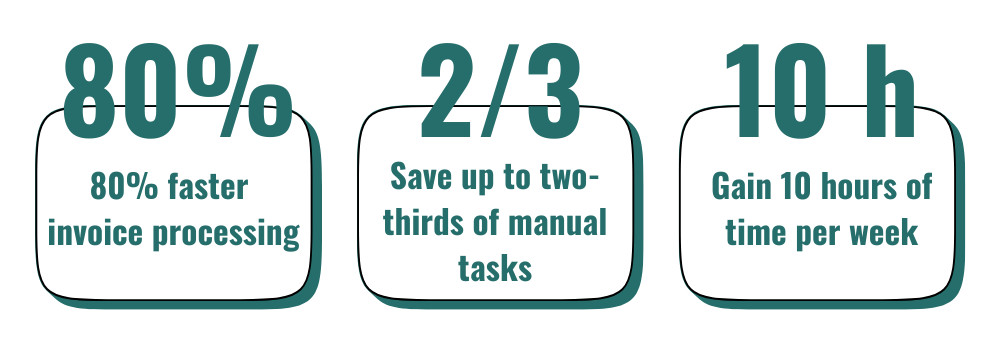
Speed up your invoice management with Continia Document Capture.
Invoice management often involves small or large errors that not only lead to lost time but can also reduce workflow efficiency in the long run. Even a minor inaccuracy during document entry or retrieval can disrupt administrative processes and potentially result in more serious consequences.
Continia Document Capture offers a solution that automates the key steps of invoice processing. By supporting data entry, accounting, and document management, the system helps reduce manual tasks — making processes more transparent and secure. This allows users to focus more on meaningful, value-adding work.
Reduce repetitive manual data entry with Document Capture’s intelligent OCR (Optical Character Recognition) technology. The system automatically recognizes text and places it into the correct fields within Business Central — minimizing errors and saving your company valuable time.
Invoice approval workflows can often be time-consuming — especially in larger organizations. With Document Capture’s automated processes, approval steps become faster and more transparent, reducing wait times and administrative burden.
Thanks to remote access to electronic documents, team members can review and approve materials from anywhere — whether they’re in the office or on the go.
Continia’s solution provides a clear overview of all your contracts, making it easy to search, track, and manage them — saving valuable time on administrative tasks.
Reduce the burden of paper-based administration: store, organize, and preserve your data securely while ensuring document authenticity and compliance. Track every document from arrival to posting, and retrieve changes in seconds.
Make your procure-to-pay process more efficient with the simple and compliant use of electronic documents. XML-based files transmitted securely via the Peppol eDelivery network enable smoother business operations — while ensuring your company remains compliant with both European and local regulations.
Minimize the risk of errors and ensure consistency with Document Capture’s automated three-way matching feature. The system automatically approves invoices within the defined tolerance levels.
Fast and flexible document management process
Continia Document Capture processes incoming invoices at lightning speed. Whether they arrive in paper form, spreadsheets, or emails, it automatically recognizes and records the data — making administration simple, scalable, and fully automated.
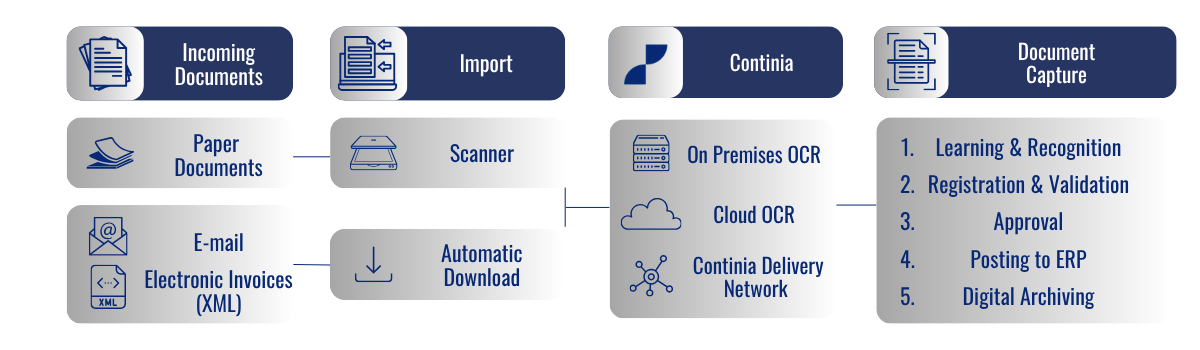
Discover how Continia Document Capture can integrate seamlessly into your company and support your business processes every step of the way.

Industry-leading user satisfaction
Continia Document Capture can reduce manual administrative tasks by up to 90%. By automating document processing, the solution significantly reduces the amount of manual work required, allowing finance teams to focus on more complex, value-adding activities that require professional judgement and active involvement.
Its user-friendly interface and seamless integration with Microsoft Dynamics 365 Business Central enable rapid adoption and efficient day-to-day use.
Through digital approval workflows, automated matching and reconciliation, and transparent document archiving, employees can work more simply, efficiently, and securely.
Seamless Automation and Complete Visibility in One Solution
One of the key benefits of the solution is its fully automated workflow, significantly reducing the need for manual data entry and processing.
Continia not only makes document management faster, but also more transparent and secure. Original documents are digitally archived, making them easy to retrieve and review at any time while ensuring compliance with regulatory requirements.

Explore the Key Features of Continia Document Capture
Essential Features
Quick and easy setup – all required components are installed automatically during deployment, with a predefined default configuration for a fast and hassle-free start.
Automatic recognition of characters and data structures using intelligent OCR technology, capturing key information such as invoice numbers, invoice dates, due dates, totals, and other critical business data with high accuracy.
Register invoices and credit memos individually or process multiple documents simultaneously in a single step, saving time and reducing manual effort.
Reduce the risk of errors by automatically detecting changes to previously recorded data, such as bank account numbers or contact details, on incoming documents. This helps ensure data accuracy, identify unexpected modifications, and strengthen financial controls.
Create purchase invoices and credit memos directly from OCR-recognized PDF documents, eliminating manual data entry and accelerating document processing.
Supports all major XML formats out of the box, including PEPPOL BIS 3, OIOUBL, OIOXML, UBL, EHF, SVEFAKTURA, EBINTERFACE, XRECHNUNG, ZUGFeRD, Finvoice, PINT Billing, PINT A-NZ Billing, SimplerInvoicing, and UTS.
Additional XML formats can be easily added through simple configuration, providing flexibility to support evolving business and regulatory requirements.
Unique integration with the PEPPOL eDelivery network, enabling you to receive electronic purchase invoices and credit memos directly within Microsoft Dynamics 365 Business Central. This streamlines document processing, improves data accuracy, and supports compliance with international e-invoicing standards.
Manage and exchange electronic invoices and purchase orders directly from within Business Central. For example, you can receive order updates from your suppliers and respond quickly through the Continia Delivery Network, enabling faster, more efficient collaboration across your supply chain.
Automatically send eDocuments when actions like posting or releasing are performed, streamlining your workflow.
Easily resend successfully sent eBilling documents to recipients when a copy is required.
Automatically identify customers’ and vendors’ e-document capabilities.
Receive PDF and XML documents attached to e-mails with dedicated e-mail addresses provided by Continia.
Split a group of invoices from a single PDF-document into multiple invoices.
Set up custom fields to recognize from invoices and credit memos, such as dimension codes.
Users receive notifications when nearing the monthly OCR page quota. Thresholds can be customized.
Admins are alerted earlier in the process about unregistered documents.
Save time with less hassle by splitting document amounts into multiple lines according to dimensions while keeping the existing account number for all created lines.
Create general journal lines and increase flexibility with small purchases by selecting a bank or G/L balancing account.
Drag-and-drop any file attached to an invoice, credit memo or vendor.
Find and see the original PDF and XML document of an invoice in seconds by using the standard built-in Navigate-functionality.
Export documents (for auditing purposes).
Save time by automatically having deferral codes applied to incoming purchase documents.
Streamline your workflow by checking document dimensions during registration so you can avoid correcting or adding missing dimensions later.
Save time finding PDFs embedded in XML documents by having them displayed by default in the document viewer.
Add multiple customizable columns to the document list, which can be sorted and filtered in various ways, in the document journal.
Securely store digital bookkeeping documents in their original form. Includes registration of documents to purchase journals. Get a central overview of documents requiring special attention due to file checksum issues and post-approval changes.
Automatically archive purchase orders when vendor updates are registered, enabling tracking of changes and access to previous versions.
Support for Multi Entity Management (MEM) by Binary Stream Software.
Ensure GDPR compliance with automated cleanup processes. Easily purge captured words, generated values, and entire records, based on document status and age, maintaining privacy and data integrity
Automatically detect duplicate transactions in Expense Management for incoming invoices and receive a warning in the Comments section.
Save time on setup by creating vendors, customers, or customer ship-to addresses directly from PDF or XML documents.
Access a central in-app assistance hub designed for convenience and user feedback.
Automatically attach and send a human-readable PDF with each XML e-document to your customers and vendors.
This feature applies to all supported formats, including orders, so partners always get a consistent version they can use—without extra effort on your side.
Save time on manual corrections when small VAT discrepancies occur. Simply set your allowed difference limits, and invoices will be adjusted automatically — keeping your workflow smooth and uninterrupted.
Automatizált telepítés és konfigurációQuickly set up e-document exchange with customers and vendors. With e-partner onboarding (also known as Peppol First), you can instantly see which partners are ready to connect.
View key details—such as supported document types, ID type, and network profile—and enroll multiple partners in just a few clicks, making partner onboarding faster and easier.
Continia Software A/S
Continia Software has been developing efficient, scalable add-on solutions for Microsoft Dynamics 365 Business Central for more than 30 years.
As a leader in financial process automation, Continia helps organizations save significant time while reducing errors and improving efficiency. Its solutions are fully embedded within the Microsoft Dynamics 365 Business Central environment, eliminating the need to learn and work with separate systems.
For assistance with the implementation of Continia Document Capture, contact MultiSoft Kft., Continia’s trusted and certified partner.


Considering a Business Central implementation?
We're here to help!
Backed by decades of experience in consulting, development, and business solutions, our team has contributed to the successful delivery of numerous Microsoft Dynamics NAV and Dynamics 365 Business Central implementations. We help companies achieve a smooth transition and get the most out of their Business Central investment.

Akik már minket válaszottak
A 2011-es zárókészlethez képest a 2012-es évet 30%-kal alacsonyabb készletszinttel zárhattuk, ami nagyjából 20 millió forintos megtakarítást jelentett. Rövid számítások után magunk is meglepődtünk, amikor bebizonyosodott, hogy már az első hónapban megtérült a MobileNAV beruházás: a területi képviselők egy nap alatt több ügyfélhez jutnak el, így jóval több megrendelést rögzíthetnek.
Kifejezetten elégedettek vagyunk a szakmai hozzáértéssel, a rugalmassággal és a problémamegoldási készséggel. Bármivel fordulhatunk hozzájuk, mindenre van ötletük. Csak így tovább!

A tulajdonosunk Németországban nagy megelégedéssel használta és használja a mai napig a Navisiont. Az ő ajánlásukra vettük fel először a kapcsolatot a MultiSofttal, majd a többszöri személyes találkozó alkalmával sikerült felkelteniük az érdeklődésünket. A cég felkészültsége és hozzáállása meggyőző volt, minden problémára találnak megoldást! A programot kifejezetten rá lehet szabni a cégünk egyedi kéréseire. A színvonal nagyon magas, a munkatársak kompetenciája megfelelő!